Tuesday, March 1, 2016
Which Pixar character is Donald Trump?
I have strong political feelings, but I rarely comment on them, especially when it concerns people. I like recently deceased Justice Antonin Scalia's maxim: "I attack ideas not people." But people get elected and so occasionally commenting on a person is part of the process in our country. Here's my comment for today:
I think I found Donald Trump in the Pixar movie, "Up!" Tell me what you think.
I think a vote for Donald Trump is a vote for an unprincipled do-whatever-it-takes bully, a guy who admittedly has given lots of money to both political parties because it buys him access. Do you think someone who buys access isn't going to sell access? Do you think someone who uses eminent domain to force people off their property for the sake of his development efforts is going to be the champion of the little guy once he is elected?
I understand that there is a great deal of anger out there on the part of conservatives, libertarians, constitutional originalists and the like. It seems like no leader is fighting the socialist trends you fear. But do you think Donald Trump is really conservative or just tapping into that frustration? Do you think Donald Trump is really a champion of individual liberty or he is just tapping into that frustration. Do you think Donald Trump really respects and reveres the principles of our constitution or do you think he is just tapping into that anger? I think he is none of those things and just recognizes the opportunity that is presenting itself.
The developer in "Up!" saw the opportunity to get Carl's property for his building project by having Carl committed to an institution after Carl briefly lost his temper when the construction crew damaged a mailbox his deceased wife had painted. It was all an accident, but the circumstances were irrelevant to the developer. He found a way to get what he wanted, so he took it. He was a winner.
I, myself, lean to the conservative, libertarian, constitutional originalist side of politics, though I think there is a middle ground to be sought for a compassionate society.
But I think a vote for Donald Trump is a vote for the guy who took Carl's home.
Friday, February 26, 2016
Vidcast/Podcast Bible study on "Adiaphora: Things Neither Commanded Nor Forbidden."
In this Dig Deeper Bible Study, we look into the Greek word, "Adiaphora," which means, "things neither commanded nor forbidden. This is part 2 of the 7 part series: Seven Greek Words Every Christian Should Know.
MP3: https://archive.org/details/DigDeeperBibleStudyPPTAdiaphoraMP3
YouTube Video:
MP3: https://archive.org/details/DigDeeperBibleStudyPPTAdiaphoraMP3
YouTube Video:
Three Programs Every Non-techie Needs to Have and Use on their Computer
I am not a tech blogger. But I am technically proficient and get asked for help on a fairly regular basis. I was recently asked to help a friend who has ads beginning to appear on her computer. I wrote her an email describing three free programs that I think everyone should have and how to use them. It seemed useful enough that I decided to post it to my blog. Perhaps it will help you.
I hope this helps somebody. And if you are reading this and have commentary or better suggestions, by all means post 'em! I am proficient but no expert and am always willing to learn.
Dear <friend>,
First, install antivirus software on your computer. You don't need to pay for it unless you want extra bells and whistles (e.g. you can schedule a scan instead of always having to initiate it manually). I never pay for them because they work all the time in the background and and I don't need the extra stuff. There are several good programs out there. I have been using AVG Antivirus and it seems good to me. Follow this link to download and install AVG Antivirus. AVG.com After you install the free version, it should ask if you want to run a complete scan. Do it. If it doesn't ask you, do it anyway. It should be fairly obvious how to do it. It may takes some time. After that, AVG will keep protecting you. Occasionally scanning your whole computer is a good idea, in case something sneaks in somehow.
Second, install a program called Malwarebytes. Follow this link to download and install the program: https://www.malwarebytes.org/antimalware/. Again, the free one is fine unless you want the automated features (e.g. automatic upgrades instead of you having to click a couple of times when it tells you it needs an upgrade). Once installed, run the most thorough scan you can. It may take some time. After that, Malwarebytes will keep an eye on things.
The third program I am going to tell you about is simply to keep your computer running better. It's called CCleaner. Like the others, there is a free version and a paid version. You only need the free version. https://www.piriform.com/ccleaner/download. This program will do several things for you... and do them simply and well. When you install it, it may ask you if you want to add a CCleaner option to your trash can menu (or something like that). I suggest you do it because it makes it easy to find and use. Once it's installed, you can right-click on the trash can to bring up a contextual menu and CCleaner will be right there. There are two options: 1) Open CCleaner and 2) Run CCleaner. I don't ever use "Run CCleaner" because that is the automatic junk cleaning routine and I'm a control freak about what goes on in my computer. It may be the perfect thing for you. If you choose "Open CCleaner," you will see several options. This is what they do and how to use them:
- Cleaner - this will clean out all your junk files which can use up hard drive space and really slow down your computer if you start to get a lot of them (things like pictures on web sites can get saved on your computer without you knowing it in a place called the 'cache.' That's why web sites often seem to open so much faster after the first time you visit them... because much of the web site is already on your hard drive. You can run this as is or you can customize what you want deleted and what you don't. I typically uncheck the 'cookies' box because cookie files are what web sites use to store your data about you. So if you like web sites remembering you, don't delete the cookies. That being said, many cookie files are ad and click tracking files to track what you've clicked on. (Ever notice that your FB ads change based on what you've been shopping for?)
- Registry - Registry files are basically cross-reference files that your computer uses. Over time computers can build up a ton of extra registry files that it doesn't need. This, of course, can slow down your computer. You can safely use this module without any worry of causing harm to your computer. Just click 'analyze' and let it run. The first time you do it, it may take some time and find an awful lot of files. When it is done, click 'fix selected issues." Fix all the issues. It will as you if you want to save a registry backup. You probably should, just in case. But I've never had to use one. Make a folder called Registry Backups somewhere on your hard drive and put the backups in there each time you run the registry module on CCleaner. (every few months at random is fine... or whenever you feel like your computer is starting to act up a bit).
- You can use "tools" and the other things, but I'm not going to explain how because you should learn yourself or you shouldn't mess with them. They are not complicated, but some options could cause problems (for instance, if you disable or delete a startup program that you need).
I hope this helps somebody. And if you are reading this and have commentary or better suggestions, by all means post 'em! I am proficient but no expert and am always willing to learn.
Tuesday, January 26, 2016
30 Minute Video (or audio) Lesson on Jesus Rejected in his Hometown (Luke 4:11-30)
A 30 minute online Bible study on Jesus being rejected by the people of his home town, Nazareth. Grab a cup of coffee, relax, and learn something for the next 30 minutes.
YouTube video:
Audio Podcast:
Wednesday, January 20, 2016
45 minute video lesson on the Wedding at Cana in John 2:1-11
This audio/video presentation is similar in content to the Bible study on John 2:1-11 except that it contains a great deal more info. If you prefer your information presented to you, this is the resource for you.
Monday, January 18, 2016
Commentary & Bible Study on JOHN 2:1-12 (Horrible typo in main Bible reference in blog. Sorry.)
- Do you like weddings? Why or why not?
- Read
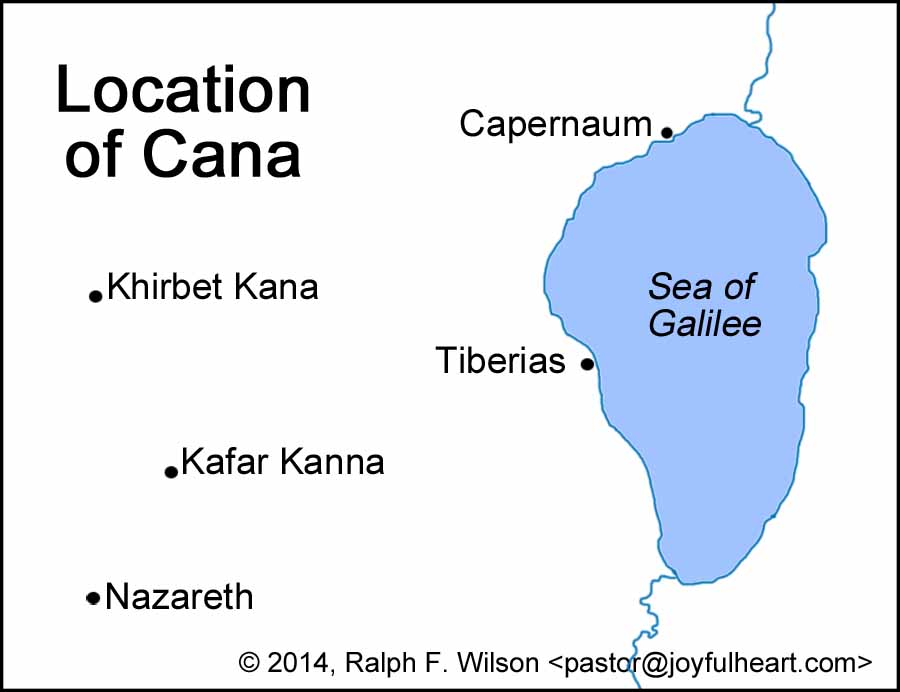
LukeJohn 2:1-12 - CANA: Cana is in the vicinity of Nazareth, Jesus’ home town. While the location of Cana is not definitively known, you can see from the map below that it is no more than about 7 miles from Nazareth, about 2.5 hours walk (close enough that visiting for one day is not unreasonable).
- WEDDINGS: Weddings at this time were huge community affairs. The couple would be betrothed (a legally binding contract) while physical consummation was reserved for the wedding night. On the day/evening of the wedding, the groom would begin at his or his parents’ home and walk through the town to get his bride. Friends and family would be waiting along the way to join him. This would be a loud and joyful party with singing. The groom would get the bride from her home and they would walk back in a procession of ever growing numbers back to the groom’s (or groom’s parents’) home for the wedding ceremony. The couple would have a place of honor under a canopy during the wedding banquet after which they would depart physically consummate their marriage while the party went on. They would return and the party would continue. The wedding feast would last up to 7 days. More distant relatives and friends might leave early, but the close relatives and friends would stay for the entire 7 day feast. It was a great disgrace to not provide full and gracious hospitality during the wedding feast, in some writings likened to thievery.
- Read a prophecy about the restoration of Israel in Amos 9:11-15 and note how wine fits into this prophecy.
- “THEY HAVE NO WINE” Why does Jesus choose to intervene? Here are three possible forces at play. Which do you think was the strongest?
- The host would be disgraced.
- The feast would end early.
- His mom asked him to.
- What do you think of Jesus’ reaction to his mother? (You might want to read Jesus’ Parable of the Two Sons recorded in Matthew 21:28-32).
- Mary seems to assume that Jesus will respect her wishes even though he is a 30 year old male rabbi with a cadre of disciples. What does this tell us about Jesus’ relationship with his mother? Does this tell us anything about the commandment to “Honor your father and mother.”?
- There may be some symbolism in the six stone jars to be filled with water. Recall that water is the substance over which the Spirit of God hovers in Genesis 1:2 before creation begins. Then, in six days, creation is complete. Wine could be considered a “completed creation” product because a) it requires human involvement in its production, b) it is for enjoyment of man, and c) it is a feast drink, when the work is done. This also fits in with verse 11 of our text, where John writes that this is the “first” of Jesus’ signs. John labels another miracle the “second sign” (see John 4:54). Scholars have speculated that John constructed his Gospel around seven signs to indicate Jesus’ divinity in a literary way. The seven signs (in one view) end with the resurrection of Lazarus. The signs are, in order:
- Changing water into wine in John 2:1-11
- Healing the royal official's son in Capernaum in John 4:46-54
- Healing the paralytic at Bethesda in John 5:1-18
- Feeding the 5000 in John 6:5-14
- Jesus' walk on water in John 6:16-24
- Healing the man born blind in John 9:1-7
- Raising of Lazarus in John 11:1-45
- The text indicates that the wine Jesus made was consider by the master of the feast (who could certainly discern good wine from bad) to be excellent, the best wine of the feast. What might this teach us about God’s gifts and his desire for us?
- MANIFESTED HIS GLORY: “Manifest,” as a verb, means to “display or show (a quality or feeling) by one's acts or appearance; demonstrate.” What does this miracle show to you about Jesus?
- What else struck you?
- Close with prayer.
Monday, January 11, 2016
Bible Study on Luke 3:15-22
- First (if you are doing this study soon after), how was your Christmas? Share a special moment, a surprise, or just something that you enjoyed.
- Do you have godparents and how, if at all, are they involved in your life today?
- Read Luke 3:15-22
- In verse 15, do the people know who they are looking for or understand what they are looking for when they are looking for the Christ?
- Note: The word, “Christ,” is a Greek translation of the Hebrew word, “Messiah.” A “messiah” is an anointed one, “a person having sacred oil poured ceremonially on one’s head, and so become a person with special authority and function, with the implication of one having the choice and approval of God”[1] The pouring of oil is secondary to the being called of God for a special purpose. Look up the following verses to see uses of the word, “messiah,” in lower context than the ultimate messiah, Jesus of Nazareth:
- Leviticus 4:3, a priest is called the “anointed.” This is the Hebrew word, “messiah”
- Isaiah 45:1, the Assyrian king, Cyrus, is called the Lord’s anointed. Again, the Hebrew word here is “messiah.”
- Psalm 2:2, apparently a prophecy about the messiah who would rule the world.
- Acts 2:36, Christians see Jesus’ resurrection as proof that he is, indeed, the “anointed one,” the One set apart by God for special authority and function.
- In verse 16, how would you say John perceived the coming Christ?
- For a more detailed account of Jesus’ baptism, including John’s understanding of his role and how he would identify the messiah, read John 1:19-34.
- In verse 16, John says the messiah will baptize with the Holy Spirit and with fire.
- “Baptism” is a ritual cleansing (with water). What do you think John means by saying the messiah will baptize with the Holy Spirit and with fire?
- What kind of activity is symbolized in verse 17?
- Verse 17 uses details that would be very familiar to an average person in Jesus’ day. A “winnowing fork” is basically a pitch fork. A “threshing floor” is “a surface of hard dirt or stone, for beating or trampling grain heads.”[2] Trampling the grain breaks the chaff loose. The chaff is the light outer husk of the grain, similar to the thin outer skin of a peanut. After threshing, the grain is tossed into the air with the winnowing fork. The heavier heads of grain fall back to the floor while the light chaff is blown away.
- Verse 18 calls John’s message “good news.” How do you understand baptism with fire and threshing to be good news?
- It may be helpful to remember that the Promised Land was, at this point, occupied by the Romans. Also, the central narrative of Jewish life is the Exodus, celebrated every year at Passover.
- Verses 19-20 are a flash-forward (as opposed to a “flashback”). The Gospel of Luke was probably composed around AD60. These verses are the Luke’s parenthetical comment about what Herod did later.
- In verse 21-22, who is Jesus baptized with? What unique thing happens to Jesus?
- What else strikes you in this passage?
- Close with prayer.
[2] Swanson, J. (1997). Dictionary of Biblical Languages with Semantic Domains: Greek (New Testament) (electronic ed.). Oak Harbor: Logos Research Systems, Inc.
Subscribe to:
Posts (Atom)